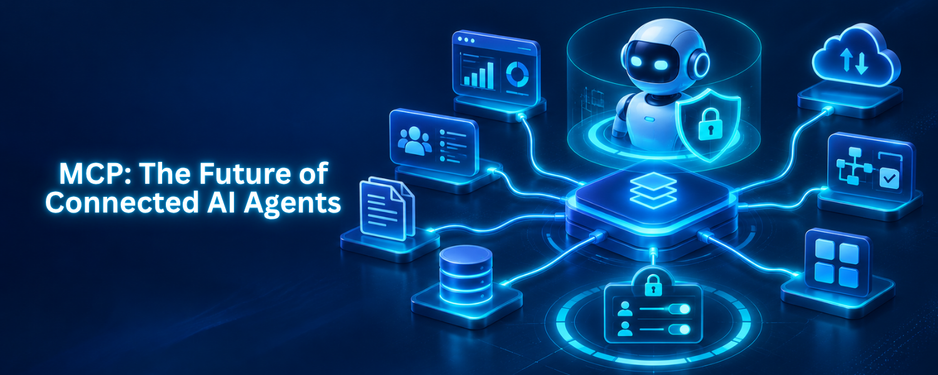

The Model Context Protocol is an open standard for linking AI applications with external data, tools, and workflows via a common interface. Teams publish their capabilities once to an MCP server that will be used by any AI client that is compatible. By 2027, the Model Context Protocol is the standard method for connecting AI agents to internal services, business applications, and databases. In this guide, we will explore what MCP is, how it differs from that of APIs and function calling, how MCP integration will work, where the agentic AI revolution in CRM is going, and the security concerns that will need to be accounted for along the way.
What Is MCP and Why Does the Model Context Protocol Matter?
What is MCP? It’s a common communication path between AI applications and systems they must interact with. It’s like a plug-and-play universal connector for all one-off integrations that is standard, predictable, and universal.
What Is MCP in Simple Terms?
According to the official documentation, MCP is like a USB-C port for AI. The one cable that now powers a phone, a laptop, and a tablet can now power an AI application to access files, databases, search engines, and business tools through a single protocol.
Where Did the Model Context Protocol Come From?
The Model Context Protocol was developed by Anthropic in late 2024 and has since been transferred to the Linux Foundation’s Agentic AI Foundation. The fact that the standard is no longer solely owned by one vendor is important, as it will facilitate cross-vendor interoperability. It’s supported by Claude today, as well as ChatGPT, Visual Studio Code, and Cursor.
Why Is Adoption Raising the Stakes?
There are risks and opportunities for growth. By 2028, 25% of enterprise GenAI applications will experience at least 5 minor security incidents per year, according to Gartner, as organizations develop applications based on an agentic approach, such as MCP. This is why agentic AI security must be part of the plan right from the initial stages.
Who Benefits From MCP?
- Developers: Develop a single integration, rather than multiple integrations, which saves development time and maintenance.
- AI agents: Access a larger ecosystem of data sources, tools and apps.
- End users: Obtain assistants to take action on their behalf, rather than respond with answers.
- For businesses: Ensure that access to data is controlled at one layer (governed) rather than within an array of scripts.
How Does the Model Context Protocol Work?
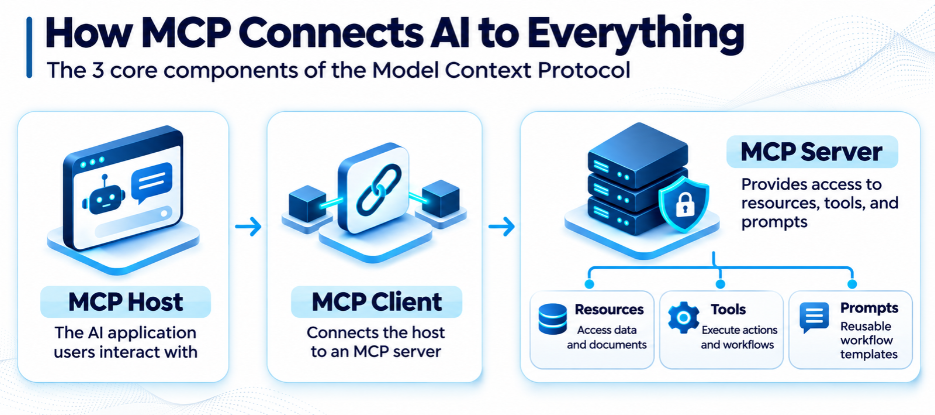
The Model Context Protocol is client-server based. There are three roles, and an understanding of them will make the rest of this guide that much easier to follow.
What Are the Three Core Components?
Each component has a clear job:
- Host: the AI application the user interacts with, such as a chat assistant or coding tool.
- Client: a connector inside the host that keeps a dedicated link to one server.
- Server: the program that exposes data, tools, and prompts to the client.
What Is a Model Context Protocol Server?
A model context protocol server is a small program that provides capabilities to the AI clients in a common manner. It can be installed on the laptop or as a hosted service. All model context protocol servers have the same capabilities, which are represented by three building blocks:
- Resources: data that has only been read, such as data files, databases, or documents.
- Tools: actions that the model can request, such as running a query or creating a ticket.
- Prompts: Reusable templates to follow a workflow with the model.
The server controls the logic, so you can replace the AI model without having to redo the connection. Servers also tell agents what they can do, so the agents learn the tools that are available at runtime rather than having to learn them from a hard-coded list.
How Does a Typical Request Flow?
A single request moves through four steps:
- The user requests something in the host application.
- The client prints the tools on the connected servers.
- The model selects a tool, and the server executes the tool over the real system.
- The result is fed back to the model, where the final answer is written.
This cycle can be repeated as many times as the task requires, making the Model Context Protocol ideal for agent tasks that require multiple steps.
MCP vs API: What Is the Difference?
This is the question teams ask first, and the answer is that MCP does not replace APIs. It sits on top of them, giving AI agents a smarter way to use the systems APIs already expose.
How Does MCP vs API Compare at a Glance?
An API tells a developer how to talk to one specific system. The Model Context Protocol gives an AI agent a standard way to discover and use many systems without custom code for each. The table below sums up the main differences.
| Factor | Traditional API | MCP |
| Built for | Developers writing code | AI agents making decisions |
| Discovery | Read documentation manually | Agent discovers tools at runtime |
| Integration effort | Custom per system | Build once, reuse everywhere |
| Best for | Fixed, predictable workflows | Flexible, multi-step agent tasks |
When Does an API Still Make More Sense?
A choice between MCP and API is hardly always an either/or situation. Most MCP servers call regular APIs in the background. They are just wrapped up in the protocol so that an agent knows what each one is, and when to use it. For the workflows that are fixed and predictable, it is often the easiest solution to use a direct API call.
MCP vs Function Calling: Which One Should You Use?
Function calling allows a model to call a function that you specify. It is suitable for small single-app systems but needs to be reimagined in other locations for each function.
The scope is the only thing that makes the difference between MCP vs function calling. MCP is standardized around the layer that calls the functions, thus allowing tools to be defined once in a single server and then used across models and vendors in any compatible client.
An easy guideline for MCP vs function calling: function calling for quick prototypes within one application; MCP when multiple agents, models, or teams require the same tools.
How Does MCP Integration Work in Practice?
The integration of MCP is about more than just coding new code: it’s about what an agent can see and do. An MCP-integrated tool makes for a single controlled layer that can be used over and over again by each agent, when integrated correctly.
What Are the Steps for a Successful MCP Integration?
Most teams follow a five-step pattern:
- Pick one use case. Begin with a simple, high-value process, like summarizing customer tickets.
- Draw your data sources. Identify the databases, apps, and files that the agent needs.
- Design or select servers. If available, use an existing server or create your own using the official SDKs.
- Set permissions. Provide tools with the minimum access and require permission for sensitive activities.
- Test, monitor, expand. Record each call of the tool, review results, and gradually add more use cases.
Why Is the Model Context Protocol Important for AI Agents?
An agent can only be as useful as the systems he is able to access. The reach problem is addressed by MCP for AI agents by providing each agent with one standard method of locating and utilizing tools.
How Does MCP for AI Agents Change Development?
With the Model Context Protocol, an agent can look up what tools are available, understand what each one does, and call them in sequence to finish a task. Without that shared layer, every new agent means another round of custom engineering.
What Does Agentic AI in CRM Look Like With MCP?
One of the obvious areas where this is evident is in customer relationship management. Agentic AI in CRM is more than just recommending the next steps. When a user is connected via MCP, the agent can follow up on an account’s history, view open support tickets, create a follow-up email, and update the record within permissions determined by the user.
Common agentic AI in CRM use cases include:
- Lead qualification: Agent qualifies leads through CRM, web, and email information.
- Customer service: It fetches order details and policy details and then writes the reply, which will be approved by a human.
- Churn prevention: It identifies issues like decreasing usage and pushes a warning to the account owner.
- Pipeline hygiene: It warns of out-of-date offers and empty fields before checking on the weekly.
Context is the commonality. The agent’s actions are more relevant and not repetitive when the agent has a complete picture of the customer. Security and compliance teams also get one location to view what agents are doing.
What Are the Biggest Agentic AI Security Risks in the Model Context Protocol?
Real access equals real risk. But at MCP, agentic AI security isn’t just an afterthought, as any connected tool represents a potential entry point. If you know where the “weak spots” are, they’ll be much easier to close.
Which Risks Should You Watch First?
Four risks deserve early attention:
- Prompt injection: There is a possibility that hidden instructions are sent in a document or message, which can lead an agent to take harmful actions.
- Poisoned tools: A malicious or altered description of the tool may cause the agent to behave differently.
- Over-permissioned servers: Wide access opens up a lot more data than it should.
- Untrusted servers: Third-party servers are connected to the supply chain.
How Can You Secure a Model Context Protocol Deployment?
Before any client can access their data, domain experts should have their servers and set guardrails. On top of that, these practices address the vast majority of areas in an agentic AI’s security:
- Use least privilege: Give each tool access to only what it needs.
- Require human approval: Ensure that someone is involved in payments, deletions, and external messages.
- Handle authentication correctly: use conventional authorization instead of common authorization keys (OAuth).
- Check each server: You should check where the server came from, who owns the server, and how it has been kept up to date before connecting.
- Track everything: Audit trails of tool calls are possible to investigate when something looks strange.
There are dedicated security best practices in the official MCP documentation, which you should read before your first production deployment.
What Does the Future of the Model Context Protocol Look Like in 2027?
From a 2027 view, the Model Context Protocol is moving from developer experiments into governed enterprise infrastructure. Four trends show where it is heading.
What Trends Will Shape MCP Next?
- Local versus remote servers: Servers with proper authorization are taking the place of local servers, making sharing and auditing simpler.
- MCP Apps: Interactive apps return live interfaces to the AI clients, not just text.
- Server verification: Registries and verification tools should make it easier to verify who built a server, and what it can access.
- Increased governance: Buyers will want to ensure that there is an audit trail, clear ownership, and proven guardrails before approving any agent.
Conclusion
The Model Context Protocol gives AI agents a reliable, standard way to reach the data and tools they need, and by 2027 it is becoming a core layer of enterprise AI. It complements APIs, simplifies integration, and opens the door to practical use cases from analytics to customer operations. Its value depends on strong governance, clean data, and sensible security from day one. AnavClouds Analytics.ai helps enterprises design MCP servers, build secure AI agents, and turn connected data into measurable outcomes. If you are ready to move from pilots to production, connect with our team and start with one workflow that matters.
Frequently Asked Questions
What Is MCP and What Is It Used For?
An open standard, MCP enables AI applications to access external data, tools, and workflows so that AI agents can access information and perform real work without needing to create custom integrations for each system.
Who Created the Model Context Protocol?
In late 2024, Anthropic released its open-source standard, MCP. It has been adopted by leading AI tools and has been transferred under the neutral control of the Linux Foundation’s Agentic AI Foundation.
MCP vs API: Are They the Same Thing?
No. An API is used to connect software to one system, and MCP is used to provide a common method for AI agents to find and utilize a host of tools. Most of the servers still invoke APIs behind the scenes.
Is MCP Secure for Enterprise Use?
With the appropriate controls, it can be. The protocol itself does not ensure security; it’s important to use least-privilege access, standard authentication, vetted servers, human approval for sensitive actions, and audit logs.