

Years ago, the only way to find answers to data was to know SQL, hire an analyst, or wait a week to get a report. e was strong, and it was never really available. That distance is finally narrowing down, and natural language query is at the core of it.
Now, anybody in an organization, a sales manager, a marketing lead, a C-suite executive, etc., can type a plain English query and get a data-driven response in a few seconds. No code. No dependencies. No bottlenecks. By 2025, natural language processing and conversational analytics will be adopted by 50% of new BI deployments, signaling a fundamental shift in how organizations expect to interact with their data.
This is not a mere feature upgrade. It is a reconsideration of who can use data – and how quickly.
What Is Natural Language Query and Why Does It Matter in 2026?
Natural language query is just that, posing a question to your data, like how you would pose a question to a colleague. You do not type in SELECT SUM (revenue) FROM sales WHERE region= North, but rather you type in What was the total revenue in the North region last quarter? and the system works out the rest.
By 2026, it will not be a novelty, but a necessity. The amount of information that businesses produce has exceeded the capacity of conventional data analysis by many folds. AI in business intelligence is filling in that gap by converting the process of querying data to become conversational, quick, and scalable.
The fact that natural language queries are converging with generative AI is what makes it incredibly powerful at the moment. Generative AI in BI tools is no longer restricted to retrieving canned answers, but can now synthesize insights, present anomalies, and even make suggestions on follow-up questions that the user has not yet thought to ask.
The Three BI Giants and Their Natural Language Query Capabilities
When businesses evaluate AI data querying tools, three platforms consistently come up: ThoughtSpot, Power BI, and Tableau. Each takes a different approach to natural language query, and understanding those differences is critical for making the right choice.
ThoughtSpot: Built from the Ground Up for Natural Language Query
ThoughtSpot is arguably the most natural language-native platform of the three. Its core product, SpotIQ, was designed specifically around the idea that every business user can run a natural language query business intelligence without any technical training.
What sets ThoughtSpot apart:
- Search-first interface — The entire product experience is built around a search bar, making natural language query the default, not an add-on
- AI-generated insights — SpotIQ automatically surfaces trends, outliers, and correlations without the user needing to ask
- ThoughtSpot Sage — Their generative AI layer, powered by large language models, takes natural language analytics tools to a new level by generating full answers with context
- LiveBoard — Real-time, interactive dashboards that update as new natural language queries inputs are made
ThoughtSpot is ideal for organizations that want natural language queries to be the primary mode of data interaction rather than a supplementary feature. It performs exceptionally well for self-service analytics at scale.
Where it falls short: ThoughtSpot’s pricing is on the higher end, and it requires clean, well-modeled data to return accurate natural language query results. If your data infrastructure is messy, the outputs suffer.
Power BI: Microsoft’s Ecosystem Play on Natural Language Query
Power BI is different. Microsoft has not created a product based on natural language queries, but has incorporated it as a strong feature into a much larger ecosystem that is highly integrated.
Natural language query business intelligence capabilities:
- Q&A Visual- can be used to enter a natural language query in a report, with Power BI creating a visualization in real-time.
- Copilot in Power BI Microsoft built a generative AI development layer called Copilot, which enables users to write plain language reports, write DAX measures, and summarize dashboards.
- Azure OpenAI integration – Power BI uses the AI infrastructure of Microsoft, and thus, its natural language querying capabilities become more advanced.
- Auto-generated summaries — Automated insights BI products provide a tool to interpret what a chart is about without having the user interpret it.
Power BI’s biggest advantage is its integration with the Microsoft 365 ecosystem. When your organization is already powered by Teams, Excel, and Azure, a natural language query experience in Power BI is seamless and connected.
Where it fails: The Natural language query business intelligence may fail to work with complicated multi-step queries. It is optimal when the data model is well-organized, and the questions are simple.
Tableau: Visual-First, With Growing Natural Language Query Intelligence
Tableau is the standard of data visualization. It has been slower in its approach; however, with the implementation of Salesforce Einstein AI, everything has become much faster.
Tableau’s natural language query features:
- Tableau Ask Data – This feature enables users to enter a natural language query and have it automatically visualized instantly; this will be improved with time.
- Einstein Copilot on Tableau — An artificial intelligence layer that enables users to create dashboards, understand charts, and conversationally pose follow-up questions.
- Tableau Pulse — AI-based choice feature that proactively provides personalized, metric-based insights to users without having to query.
- Natural language explanations — Tableau can now tell you why a metric changed in natural language, transforming raw data into a story.
Tableau is the most powerful platform to tell a story visually. Tableau is difficult to compete with if your organization values the richness and quality of visualizations and natural language analytics applications.
Where it fails: Ask Data, despite its improvements, is not as user-friendly as ThoughtSpot search. The interface may be bolted instead of being native to users who are new to the platform.
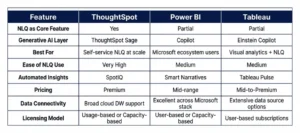
ThoughtSpot vs Power BI vs Tableau: A Side-by-Side View
What Generative AI Is Adding to the Natural Language Query Experience
The most significant shift in NLQ in BI tools in 2026 is the depth of generative AI integration. Earlier versions of natural language queries were essentially smart search — you asked, the system fetched. Generative AI changes the dynamic entirely.
Now, a natural language query business intelligence does not just retrieve data. It interprets context, suggests what you should be looking at next, generates written summaries of findings, and even flags risks or opportunities you did not know to look for. This is what separates modern natural language analytics tools from what existed just two or three years ago.
For businesses, this means AI decision-making is no longer just about dashboards — it is about having a continuous, conversational relationship with data that evolves as the business evolves.
The Real-World Impact of Natural Language Query Across Industries
Understanding which tool best is one thing — understanding what natural language query changes on the ground is another. Across industries, the impact is tangible and growing.
- In retail and e-commerce, category managers are using it to instantly pull sales performance by region, product, or time — decisions that used to take a full analyst cycle now happen in minutes.
- In healthcare, operations teams query patient flow data and resource utilization without waiting on IT, improving both speed and responsiveness.
- In financial services, risk and compliance teams use NLQ in BI tools to explore portfolio exposure, flag anomalies, and cross-reference regulatory thresholds — all without writing a single line of SQL.
What these use cases share is a common outcome: faster AI decision-making at every level of the organization, not just at the top. When a frontline manager can ask a question and get a reliable answer immediately, the entire decision-making culture shifts. Data stops being something a few people access and starts being something everyone uses.
This is also where the quality of natural language query implementation becomes critical. A poorly configured NLQ layer returns wrong answers with high confidence, which is arguably worse than returning no answer at all. Getting it right requires thoughtful data modeling, governance, and ongoing tuning.
Choosing the Right Natural Language Query Platform for Your Business
There is no universal answer to which platform wins. The right choice depends on your organization’s priorities:
- Choose ThoughtSpot if natural language query is your primary use case and you want the most intuitive, search-native experience available
- Choose Power BI if you are already in the Microsoft ecosystem and want NLQ in BI tools as part of a broader, cost-effective BI suite
- Choose Tableau if visual analytics is your priority, and you want natural language query to enhance — not replace — your existing dashboard culture
What matters most is not which tool has the best NLQ on paper, but which one your team will use consistently.
How AI Development Services Accelerate Natural Language Query Adoption
Implementation of NLQ in BI tools is not merely a software choice; it is an implementation challenge. Whether the natural language query experience can provide real value or frustrate users depends on the quality of the underlying data model, the governance structure, and the user training.
It is here that experience with AI solutions and AI development services can be seen to make a difference. Whether it is data pipeline preparation, model fine-tuning, and platform integration, the correct implementation partner will make sure that natural language queries are doing what it is expected to do, namely, correctly, consistently, and at scale.
The generative AI development services can be especially useful in cases where companies need more than the out-of-the-box natural language query business intelligence and desire to develop their own AI layers over the existing BI infrastructure.
Conclusion
Business intelligence is no longer a back-office function reserved for data teams. With natural language query at the center of modern BI platforms, data has become genuinely accessible to everyone in an organization. ThoughtSpot, Power BI, and Tableau each offer compelling approaches — but the real opportunity lies in implementing them correctly and building the right data foundation underneath. At AnavClouds Analytics.ai, we help enterprises unlock the full potential of NLQ through end-to-end AI development services, data engineering, and BI implementation — so your teams spend less time searching for answers and more time acting on them.
Frequently Asked Questions
What is a natural language query in business intelligence?
An NLQ is a business intelligence query that enables a user to pose data queries in simple, conversational language, without entering SQL or similar query builders. The BI tool will then take the question and provide an answer in the form of a relevant visualization or data automatically.
Which BI tool has the best NLQ capabilities?
ThoughtSpot is commonly considered the most natural language-based BI system, and its entire interface revolves around search-based querying. Nevertheless, Power BI and Tableau are fast catching up with the generative AI support of Copilot and Einstein, so the most appropriate option will rely on your current technology stack and application.
How is generative AI different from traditional NLQ in BI?
A traditional NLQ retrieves specific data based on your question. Generative AI goes a step further, making a synthesis of context, writing summaries, and actively attempting to discover insights and even answer follow-up questions in a conversational manner. It makes the natural language query experience seem less of a search engine and more of a smart data analyst.
Is NLQ suitable for non-technical business users?
Yes — that is precisely its purpose. Natural language query is designed to remove the technical barrier to data access, enabling business users, executives, and frontline teams to get answers from data without relying on SQL knowledge or data analysts.